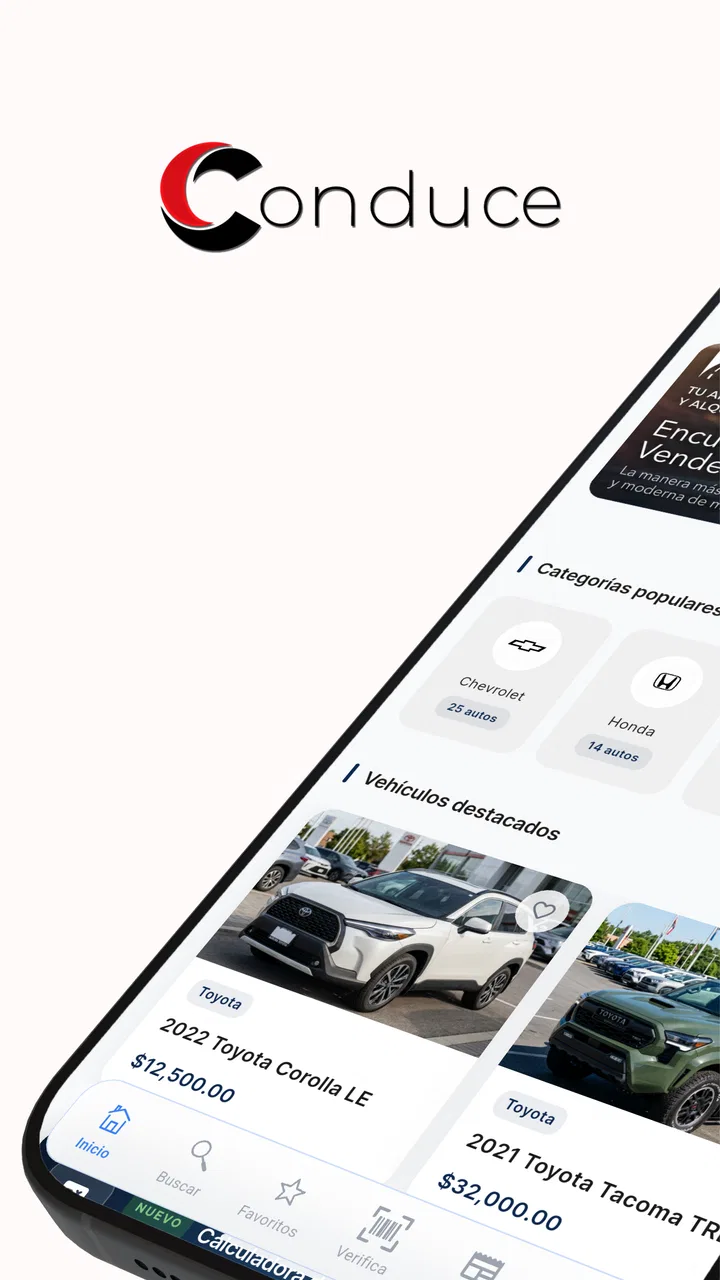
Conduce: Tu App de Carros
- 4.4
- Rating
- 50.00K
- Installs
- Free
- Price

 Analysis by App-foxy
Buying or selling a car usually becomes difficult at the exact moment when you need clear information quickly. Messages get scattered, vehicle details are easy to overlook, and the most important question is often whether the car can be trusted. Conduce: Tu App de Carros approaches that problem as an Auto & Vehicles app from NAVEGA, with a simple purpose: bring buying, selling, and vehicle verification into one place.
I found the idea more useful than a basic classifieds app because verification is part of the central experience rather than an afterthought. That does not remove the need for common sense, document checks, or an in-person inspection, but it gives the process a more organized starting point. The app is free, aimed at Teen users, and works on Android devices running version 7.0 or later. Its current version is 2.99.3.
The first thing I would tell a friend is that this is not an app that magically makes every car transaction safe. It is better understood as a practical tool for reducing confusion around a vehicle search. The strongest results come when you use it as a checklist and communication aid, not as a substitute for seeing the car, checking its condition, and making a careful decision.
You May Also Like

 Google Keep - Notes and lists
Google Keep’s Quiet Growth Shows the Appeal of Simpler Notes
As mobile work gets busier, Google Keep keeps winning a simple contest: capture a thought quickly, find it later, and get on with the day.

 Blood Strike: 2.5 Anniversary
Blood Strike’s Loadouts Turn Every Drop Into a Tactical Gamble
A close look at Blood Strike’s custom loadouts: how fast access to signature weapons reshapes its battle royale rhythm, rewards preparation, and narrows the gap between fights.

 Pandora - Music & Podcasts
Pandora’s Music Is Easy to Start, but Harder to Recover
Pandora’s strength is its low-effort path from a seed to a station. Its weak spot is how much confidence it asks you to place in connection, setup, and quiet recovery.

 8 Ball Pool
8 Ball Pool Is Built on Rivalries, Rematches, and Routine
A close look at the rivalries, rematches, shared routines, and unanswered safety questions that turn a quick pool match into a persistent mobile community.

 Samsung Music
Samsung Music’s Quiet Strength Is Playing What You Already Own
Its reach comes less from spectacle than from dependable access to a personal library. That simplicity is both the app’s strongest retention engine and its ceiling.

 AccuWeather: Weather Radar
AccuWeather Review: A Quick, Clear Forecast for Everyday Decisions
For everyday plans, the best forecast is the one you can understand quickly. AccuWeather makes rain timing, radar, and local conditions easy to act on, with a few trade-offs.
More From Our News Desk



Where the experience can become confusing
The main friction is likely to appear before the actual search: users may not know which information to prepare, what to enter first, or how much detail is needed before a vehicle becomes useful to compare. That is common in car apps because a listing is only as helpful as the details behind it. If the seller provides vague information, no interface can completely fix the problem.
I recommend beginning with one specific goal. If you are shopping, decide whether you are looking for a particular model, a type of vehicle, or simply a reliable option within a practical budget. If you are selling, gather the details you already know before opening the app. This keeps the first session focused and makes it easier to notice missing information instead of rushing through the process.
Another possible sticking point is the difference between a vehicle being listed and a vehicle being genuinely suitable. A clean-looking entry can still require questions about ownership, maintenance, accident history, documents, and mechanical condition. Conduce can help organize the search, but I would never treat a verification result as permission to skip those questions.
The most useful habit is to separate digital confidence from real-world confidence. Digital information helps you decide which cars deserve your time. Real-world checks help you decide whether one deserves your money. Keeping those stages separate prevents the app from being judged unfairly and prevents the user from expecting more certainty than any mobile tool can provide.
There is also a practical difference between browsing casually and using the app for an active purchase. Casual browsing can be quick, but an active purchase deserves notes. I would write down the vehicle details, the seller’s answers, and any points that need checking later. That record makes conversations more precise and helps you compare cars without relying on memory.
What to prepare before creating or reviewing a listing
For a buyer, the best preparation is a short question list. Ask about the car’s current condition, ownership documents, service history, and anything visible in the photos or description that seems unclear. For a seller, prepare accurate information and recent images if the app allows them in the relevant workflow. Clear details reduce unnecessary back-and-forth and make serious buyers easier to identify.
I would also avoid entering information while distracted or in a hurry. Vehicle details are easy to mistype, especially when switching between paperwork, messages, and the phone screen. A mistake in a model year, registration detail, or identifying field can create confusion later, so a quiet few minutes at the start are worth more than a fast but incomplete listing.
Because the app is free, the financial barrier to trying it is low. That makes it suitable for someone who wants to explore the process before committing to another service. Still, free access should not be confused with a complete buying service. You may still need separate arrangements for inspection, financing, insurance, transfer paperwork, or professional advice.
Simple setup checks that prevent avoidable problems
Before blaming the app for a stalled screen or an incomplete action, I would check the basics in order. Confirm that the phone is running a compatible Android version, close other apps if the device is under strain, and reopen Conduce. If a form does not appear to save, review every field rather than assuming the problem is technical. A required detail that was skipped can look like a frozen workflow.
It is also worth checking whether the information you are entering is consistent. Names, vehicle identifiers, and contact details should match the documents or the person’s intended listing information. Inconsistent entries can make a verification step feel unsuccessful even when the real problem is an input mismatch.
If an image or document is involved, use a clear, readable capture and avoid glare. A blurry photograph is not just inconvenient; it can make an otherwise useful record difficult to interpret. I prefer taking the photo again in good light rather than repeatedly retrying the same unclear file.
When a page seems slow, give the action a moment before tapping repeatedly. Multiple taps can create duplicate attempts or make it harder to know which action actually completed. If nothing changes, leave the screen, reopen the relevant section, and check whether the previous step was already accepted. This is a safer recovery pattern than submitting the same information several times.
Keep the app updated through the normal platform process when an update is available. The current release is 2.99.3, and using the current version is generally the sensible first step when a workflow behaves unexpectedly. I would also restart the phone before doing anything more drastic, especially if other apps are showing unusual behavior at the same time.
Recovering a purchase or sale workflow without starting from zero
A stalled car transaction can feel more serious than a normal app problem because the other person may be waiting. My approach is to identify the last confirmed step. Did the listing appear? Was the vehicle information accepted? Did the verification stage open? Did contact with the other party already begin? Answering those questions tells you whether to continue, review, or restart.
If the listing is visible, do not immediately create another one. First inspect it for missing or incorrect details. Duplicate entries can confuse buyers and make it harder for you to know which version contains the latest information. If the listing is not visible, prepare the information again in a note before retrying so you do not have to reconstruct it under pressure.
For a buyer, save the essential details outside the app while you are comparing vehicles. This is especially helpful if you are evaluating several cars at once. A simple note with the vehicle description, questions, seller responses, and inspection points is more dependable than trying to remember which listing contained which detail.
For a seller, treat each serious inquiry as a chance to confirm accuracy. If a buyer asks a question that exposes an unclear description, correct the information before continuing. That may feel slower, but it protects the transaction from misunderstandings and reduces repeated explanations.
If a verification attempt does not produce the result you expect, avoid guessing what the result means. Review the entered details, check the source documents, and try again only after correcting a clear mistake. If the information is accurate but the process still fails, use the app’s available support route or the platform’s standard troubleshooting options rather than inventing a workaround.
When the problem is outside the app
Some frustrations belong to the car transaction, not to Conduce. A seller may be slow to answer, documents may be incomplete, or the vehicle may not match its description. No app can turn an evasive seller into a reliable one. In that situation, the correct response is to pause the deal, ask for clarification, and move on if the answers remain unsatisfactory.
The same applies to mechanical concerns. A verification-focused workflow can help you organize information, but it cannot replace a qualified inspection. Warning lights, unusual sounds, uneven tire wear, fluid leaks, or a test drive that feels wrong deserve attention from someone who understands vehicles. I would rather lose a promising listing than ignore a physical warning because the digital details looked reassuring.
Connectivity can also create misleading symptoms. If other services are failing, messages are not sending, or the phone has a weak connection, the app may only be showing the wider problem. Try again when the connection is stable, but do not repeatedly submit sensitive or important information while the status is unclear.
There is a human factor too. Buyers sometimes expect an instant answer to a complicated question, while sellers may need time to locate documents. A delay is not automatically evidence of an app failure or dishonest behavior. I judge the situation by the quality and consistency of the response, not by speed alone.
Compared with a general classifieds platform, Conduce is more appealing when your priority is structured vehicle information and secure verification. A broad marketplace may offer a larger variety of unrelated listings or a familiar messaging system, while this app’s identity is more focused on the car transaction itself. On the other hand, users who only want the widest possible marketplace exposure may prefer a larger general service and use Conduce as an additional checking step.
Compared with handling everything through private messages, the app offers a more deliberate workflow. Private messages are flexible, but they make it easy to lose details or rely on informal claims. Conduce is a better fit when you want the vehicle information and verification process to have a clearer place. It is not necessarily the best choice for someone who already has a trusted dealer, a mechanic, and a complete paperwork process and only needs a quick message exchange.
Who will get the most value from it
I see the app working best for first-time buyers who feel overwhelmed by car listings. It gives them a reason to slow down and examine the vehicle rather than focusing only on appearance or price. It can also help private sellers present their cars in a more organized way, particularly when they want serious conversations instead of a stream of vague inquiries.
It may suit people comparing several vehicles over a few days, because a dedicated car workflow is easier to keep separate from ordinary chats and social notifications. The app is also approachable for families helping a relative search for a car, provided everyone agrees that the final decision still requires independent checks.
I would be more cautious about recommending it as the only tool for professional dealers, high-value purchases, or complicated ownership situations. Those cases may need specialized systems, legal guidance, formal inspections, and records beyond what a consumer app is designed to handle. The same is true for anyone who wants an instant buying decision without reading details or contacting the seller carefully.
The Teen content rating is worth noticing for households where a younger user may encounter the app. A teenager might use it to learn how vehicle listings work or help with research, but an adult should remain involved in any real purchase, document exchange, meeting, or financial decision. That is sensible protection, not a criticism of the app.
A realistic day-to-day example
Imagine that I need a used car for commuting and find two promising options. Instead of contacting both sellers with the same vague message, I would use Conduce to review the available vehicle information, note which details are verified, and write separate questions for each seller. One car may look attractive but leave important information unclear; the other may have fewer appealing photos but a more coherent record.
I would then contact the stronger candidate, compare the answers with the listing, and arrange an in-person inspection. If the seller changes key details during the conversation, I would treat that as a reason to pause rather than as a minor inconvenience. The app helps me narrow the choice, but the inspection and paperwork decide whether I proceed.
For selling, I would create the listing when I have the documents and vehicle details in front of me, review the finished entry, and correct anything ambiguous before sharing it. When inquiries arrive, I would keep answers consistent and avoid promising something I cannot demonstrate. This workflow takes a little more care than posting a quick message, but it produces a more trustworthy conversation.
What the public response suggests, and what it does not
Conduce has an average rating of 4.4 from around 327 ratings, with over 50 thousand installs. That is a positive sign that the basic idea is connecting with users, although numbers like these should be read as context rather than proof that every device and transaction will feel smooth.
I would pay more attention to whether the app fits my specific situation than to the rating alone. A person who wants a focused vehicle workflow may appreciate it immediately, while someone expecting a massive marketplace or a complete replacement for professional checks may come away disappointed. The rating supports trying it; it does not remove the need to use it thoughtfully.
The developer, NAVEGA, has positioned the app around the practical parts of buying and selling cars rather than a broad entertainment or social experience. That focus is its clearest identity. The trade-off is that users should not expect the flexibility of a general-purpose marketplace in every situation.
After using it as a structured starting point, I would recommend Conduce to people who want to buy or sell a car with more order and more attention to verification. Its free access makes experimenting easy, and its focused purpose is more useful than a simple stream of advertisements when trust is the main concern.
My recommendation comes with one condition: use it as part of a careful process. Prepare accurate information, check the setup before repeating failed actions, recover from the last confirmed step, and treat physical inspection and documents as essential. If you want the broadest possible marketplace or a fully professional transaction system, another service may serve you better. But for a private buyer or seller who wants a dedicated place to organize a vehicle deal, Conduce: Tu App de Carros is a sensible app to try.
In short, I see its value in reducing avoidable confusion, not in promising certainty. When used with realistic expectations, it can make the early stages of a car transaction clearer and help you decide which opportunities deserve a closer look. That is a modest role, but in a purchase as important as a vehicle, a modest tool used well can make a meaningful difference.
FAQs for Conduce: Tu App de Carros
01What is Conduce: Tu App de Carros and how does it work?
Conduce: Tu App de Carros is a mobile platform designed to help users explore, compare, and potentially manage car-related options from their smartphone. Depending on the services available in your location, you may be able to browse vehicles, review details, contact sellers or providers, and organize information before making a decision. The exact features can vary by country, account type, and current app version.
02Is Conduce: Tu App de Carros available for everyone?
The app’s availability and functionality may depend on the user’s country, city, and the local services supported by Conduce. Some features may require registration, while others could be accessible without creating an account. Before downloading, check whether the app operates in your area and review the age, device, and operating-system requirements shown on the official Google Play Store or Apple App Store listing.
03Do I need to create an account to use Conduce?
You may be able to open the application and view some general information without signing in, but an account can be necessary for interactive features such as saving vehicles, sending inquiries, managing requests, receiving notifications, or accessing personalized services. During registration, the app may request details such as your name, email address, phone number, or location. Always review its privacy policy before submitting personal information.
04Can I trust the vehicle information and offers shown in the app?
Conduce can make it easier to discover vehicle-related information, but users should independently verify important details before making a purchase, booking a service, or sharing money. Check the vehicle’s condition, documentation, mileage, ownership, pricing, availability, and seller identity directly. App listings and offers can change, and the platform may not guarantee every detail supplied by third parties or local providers.
05Is Conduce: Tu App de Carros free to download and use?
The application may be free to download, although certain services, transactions, premium options, or third-party arrangements could involve additional costs. The exact pricing structure can change according to your location and the feature you use. Before confirming any request or payment, carefully review the displayed price, possible commissions, taxes, cancellation terms, and refund conditions to avoid unexpected charges.
Pros
- Quickly compare nearby car options and prices in one place.
- Helpful filters make it easier to find a vehicle matching your needs.
- Useful for discovering local drivers and transportation alternatives.
- Simple interface makes browsing cars accessible for first-time users.
- Can save time when arranging a ride or searching for a car service.
Cons
- Availability may vary considerably depending on your city or region.
- Listings and prices can change quickly
- reducing booking certainty.
- Some features may require account creation or sharing personal details.
- Vehicle information may depend on the accuracy of individual providers.
- Support response times may vary during busy periods.

Conduce: Tu App de Carros
Gallery